

Run the whole fleet from one calm screen.
Route Relay is the TMS for carriers and brokers. Dispatch, rate cons, tracking, billing, settlements, fuel, dock, shop and compliance share one workspace, from the rate con to the settlement.
- 7-day free trial
- No credit card
- Demo opens instantly, no signup
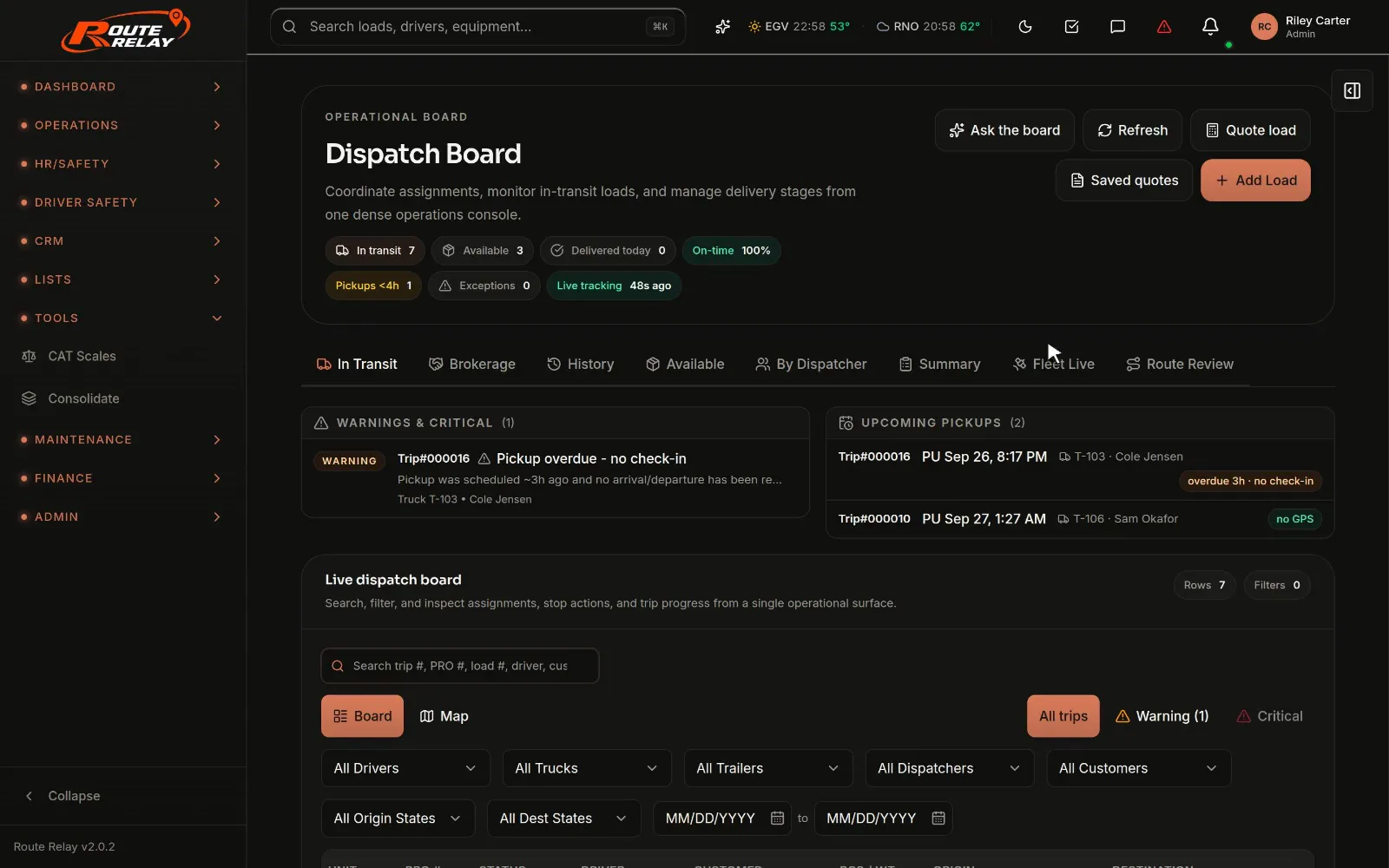
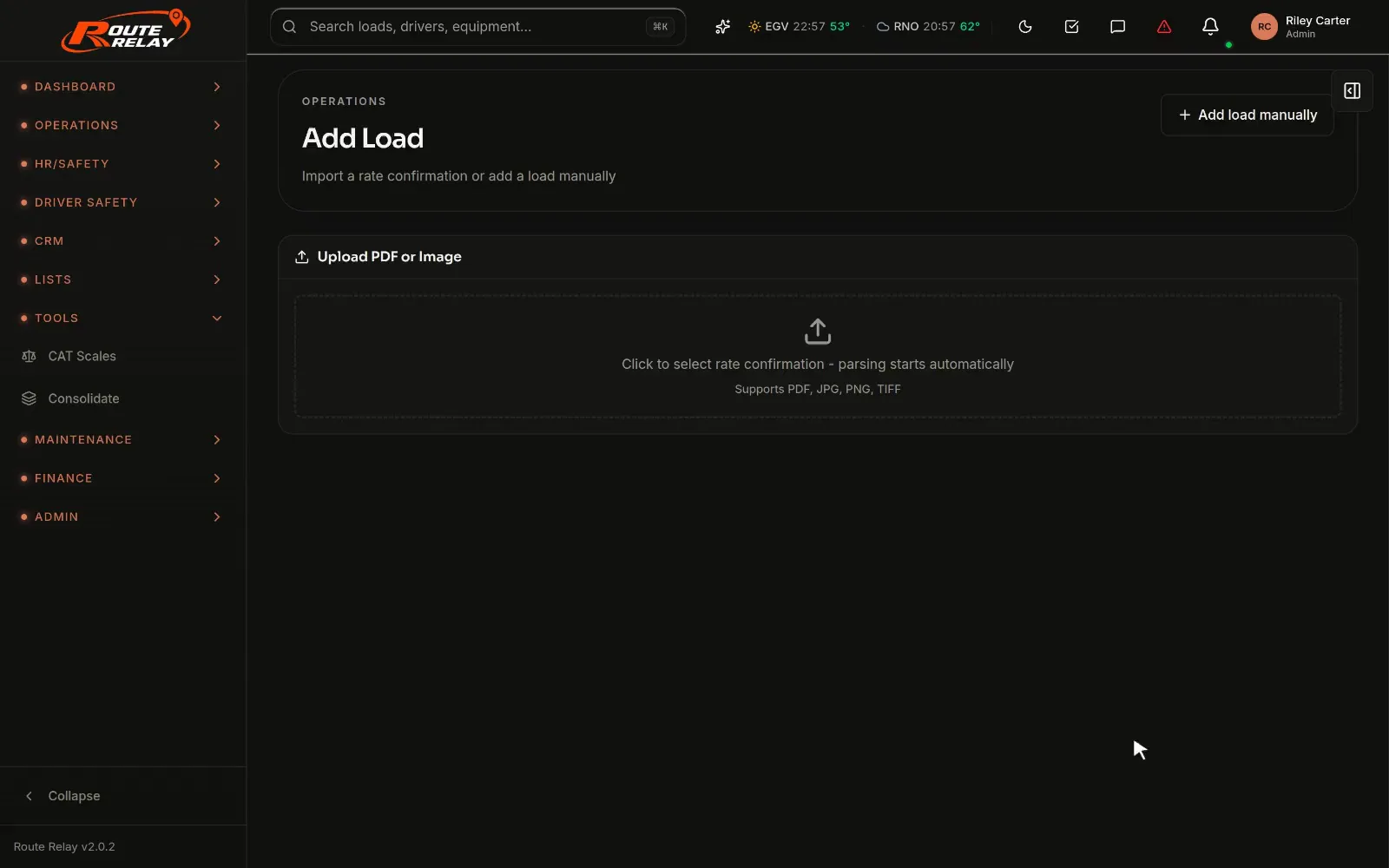
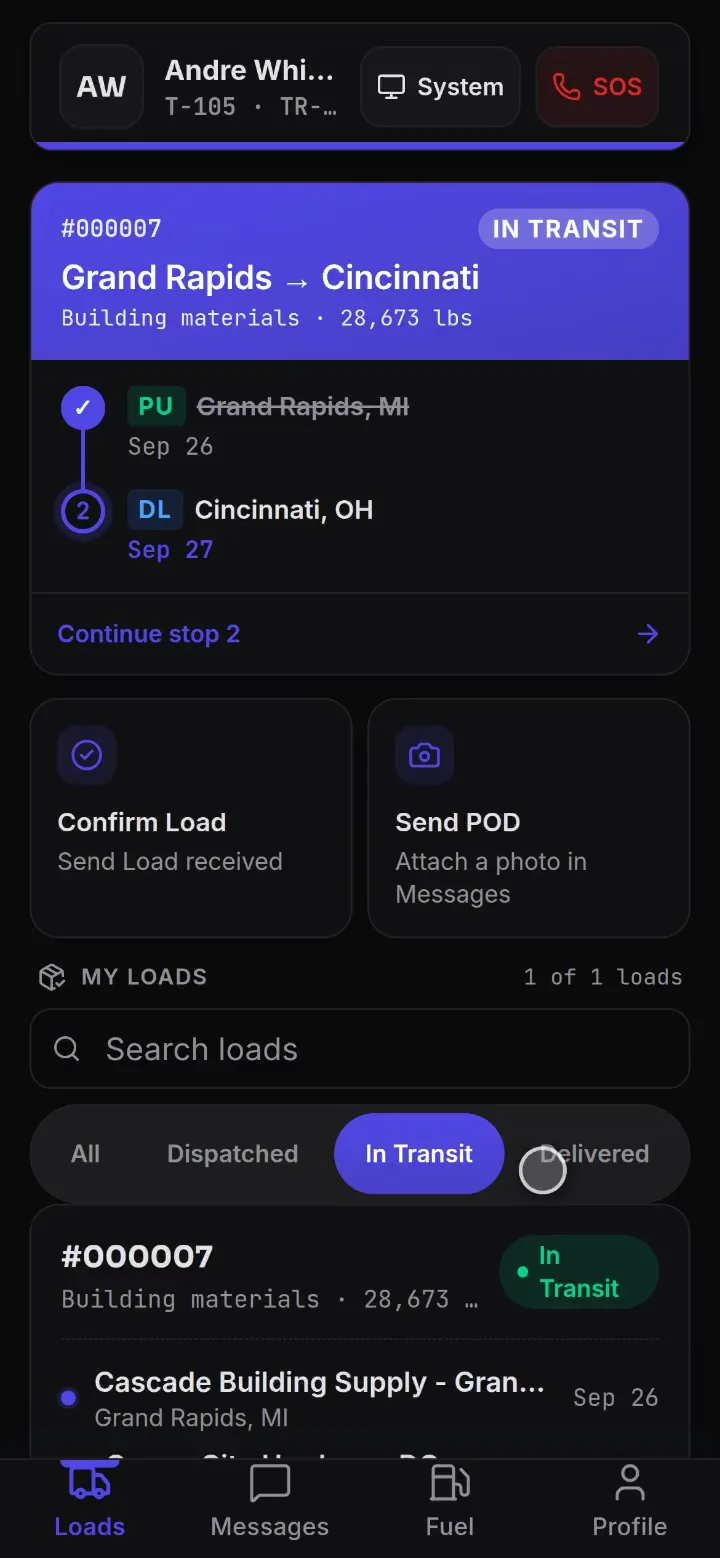
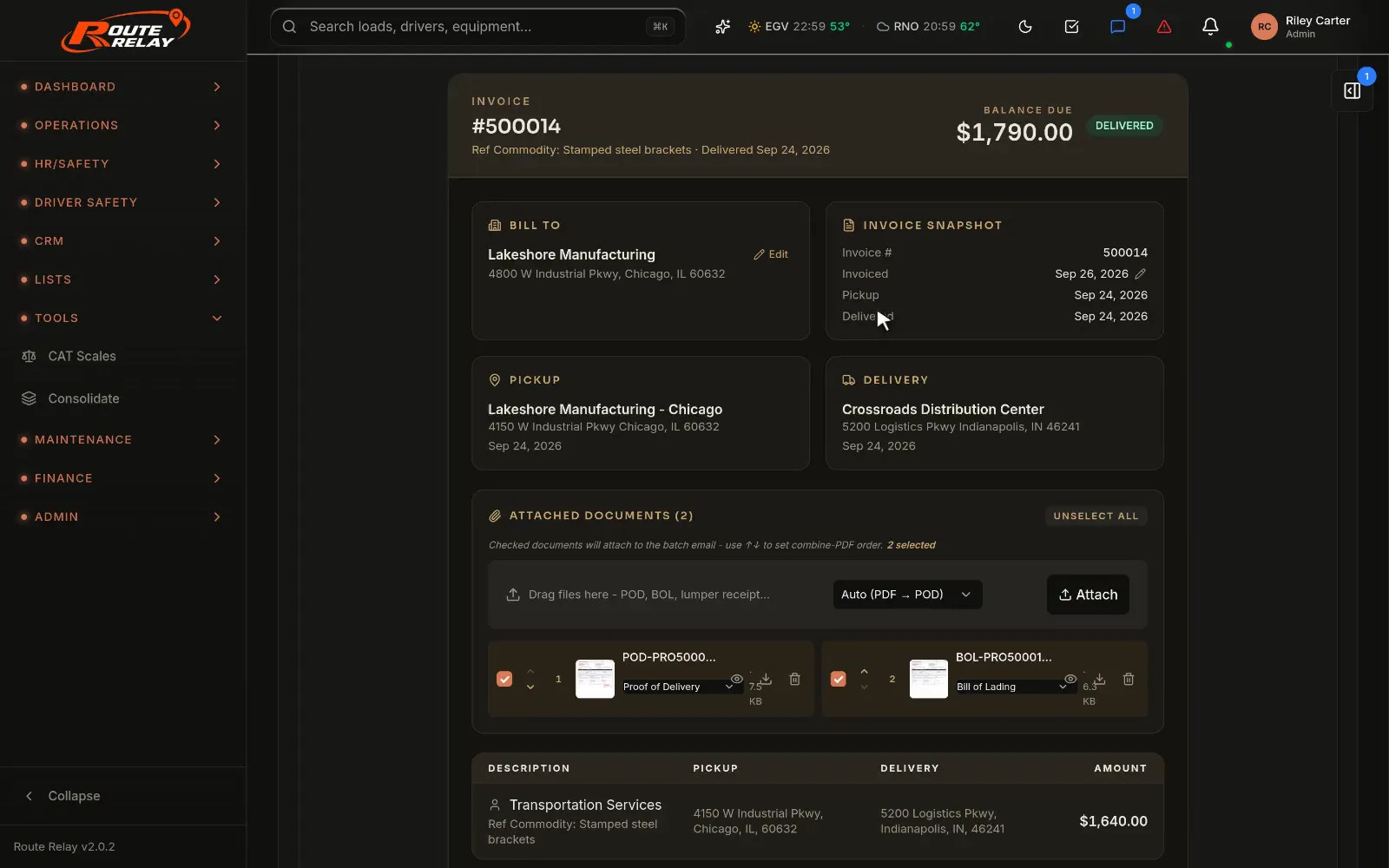
Real product screens from the live demo workspace. The floating updates show sample values from the same demo data.
- 82modules, all in every quote
- 1 clickto open the live demo, no signup
- 7 daysfree trial, no credit card
- $0setup or implementation fee
How it works
One load, from the rate con to the settlement.
Follow a load through Route Relay. Every step happens in the same workspace, on the same record, so nothing is typed twice.
- 01Rate con in
Upload the rate con, review it, create the load.
Upload the broker's rate con and Route Relay reads the broker, load number, stops, appointment windows, equipment and rate. The review shows each parse step, a confidence score, the matched customer and verified stop addresses, then Create load & save document files the original with the load.
Clean rate cons parse without AI. Add your AI key for the messy ones.
- 02Dispatch
Dispatch it with the conflicts already flagged.
Create the dispatch in one dialog: pick the truck and its driver fills in, then the trailer and where the empty miles start. Approved leave needs a written reason, compliance holds are flagged, and brokered loads get a carrier check first.
- 03Track
Know where every stop stands.
Watch each stop's milestones fill in as the driver works the load, then share a tracking link with the customer. Connect your Samsara account and trucks appear on the map, arrivals and departures record themselves, and ETAs update.
Illustration. Live GPS, automatic arrivals and ETAs need your own Samsara account.
- 04Deliver + POD
Deliver with the POD already in.
The driver works each stop in the driver app: arrived, loaded, freight and seal photos, the bill of lading, and at delivery the receiver-signed BOL as the POD. The phone's scanner turns the paperwork into a PDF that lands in the load's documents.
- 05Bill
Bill the day it delivers.
Invoice the delivered load from its record, with approved accessorials already on it and the POD and BOL attached. Mark it invoiced, then sync it to QuickBooks Desktop or export it in an IIF file.
- 06Pay
Pay drivers every week.
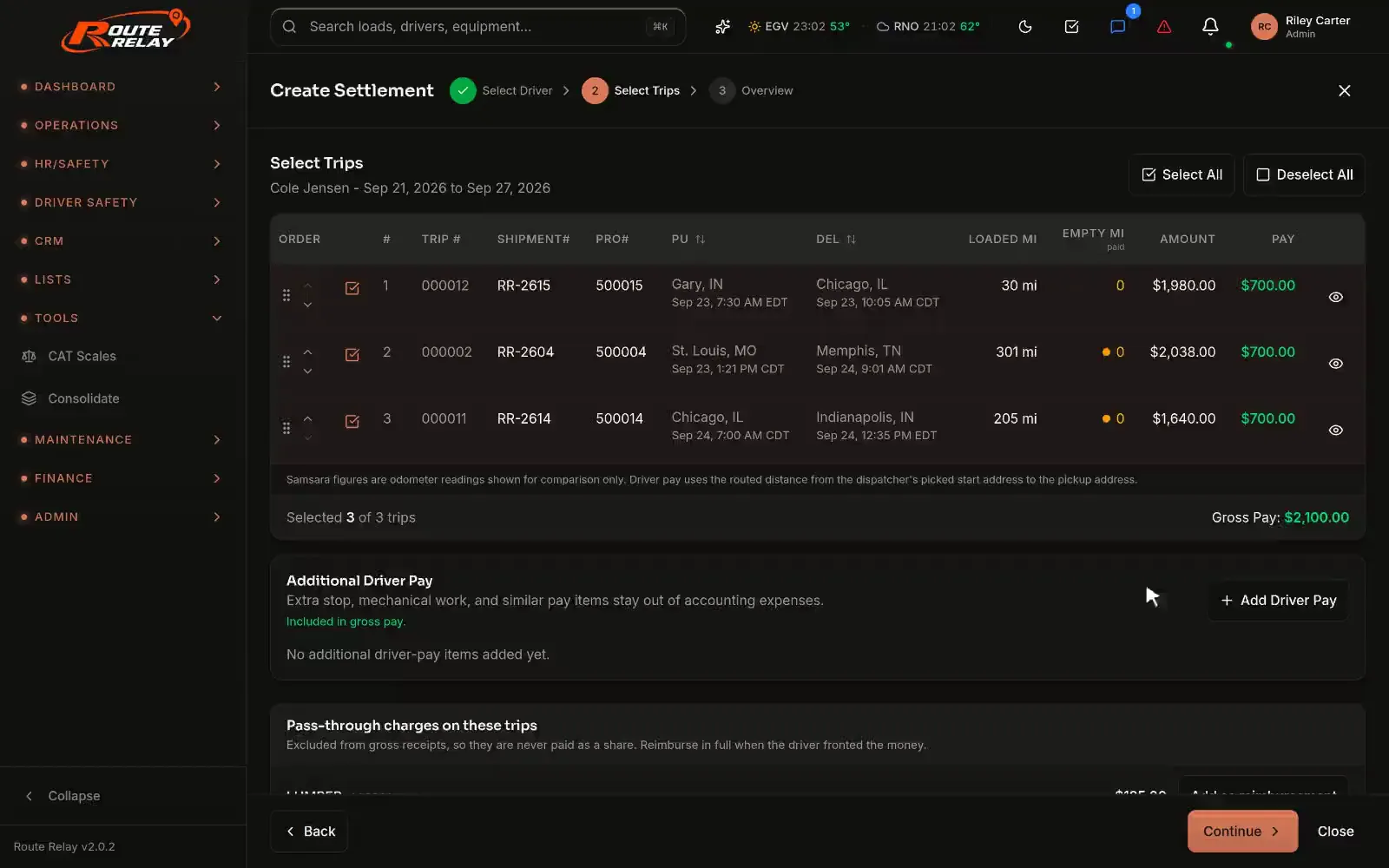
Settlements build from the trips each driver ran, with deductions and reimbursements, ready to print, download or email.
Rate confirmation import
AI, on your terms
Let AI do the paperwork. Keep the final say.
Route Relay uses your own AI provider key to read documents and answer questions about the board. Anything the AI proposes to change waits for a person to approve it.
Rate con parsing
Reads the broker, stops, appointment windows, equipment and rate from the uploaded rate con for you to review.
Invoice parsing
Carrier, parts and roadside repair invoices read into their fields and lines. Carrier invoices also flag factoring notices and remit-to mismatches.
Ask the board
A read-only copilot on the dispatch board that answers questions about your loads, trips and exceptions.
AI Actions
Suggestions wait in one review queue. Nothing runs until a person approves it.
Runs on your own Anthropic, OpenAI or Gemini key, added in Settings. Without a key, the built-in parser still reads clean rate cons.
Features
Everything a trucking office runs on.
Eight areas, one workspace. Pick one to see what it does and where it lives in the app.
Plan it, dispatch it, watch it move.
One board for what's in transit, what's available and what needs attention, with load planning and consolidation a click away.
- Create the dispatch in one dialog: truck, driver and trailer, with leave and compliance flags
- Drag a load onto another to combine them onto one trip; Ungroup reverses it
- Split a load into relay legs at a stop, or by pallets, weight or destination
- 3D load plan: steer, drive and trailer-tandem weights and GVW against limits
- An exceptions queue: overdue pickups, missing checkouts and detention
- Dispatch board
- Loads
- Load plan
- Consolidation

Answer “where's my load?” before anyone asks.
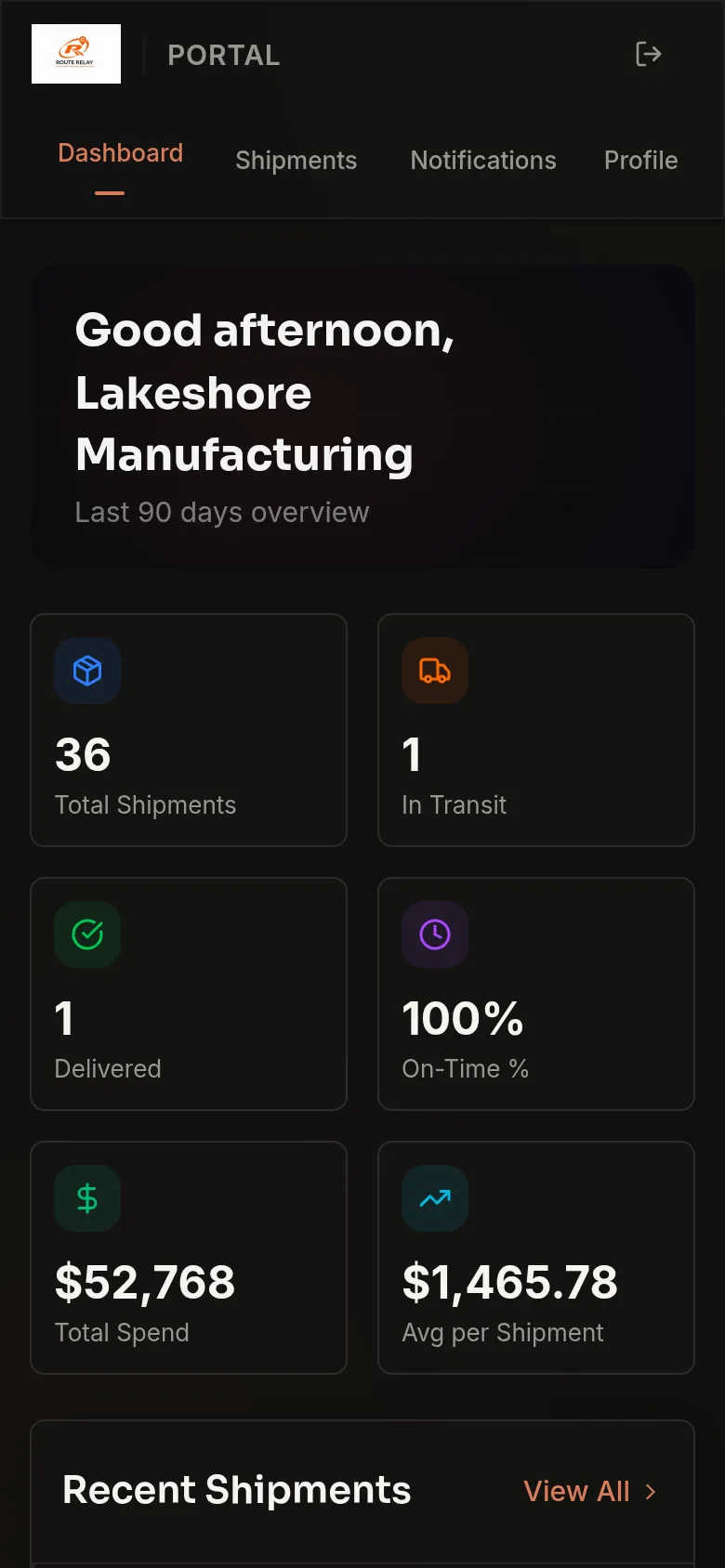
Stop milestones and a full history on every load, a tracking link to share, and a portal for customers who want to look for themselves.
- Every state change on a load in one timeline: dispatch, arrivals, departures, documents
- Tracking links that show the load's stop milestones
- Customer portal with shipments and documents, behind a password or an emailed sign-in link
- With your Samsara account: trucks on the map, automatic arrivals and departures, ETAs, HOS and drive time left
- Loads
- Tracking
- Customer portal
- Customers

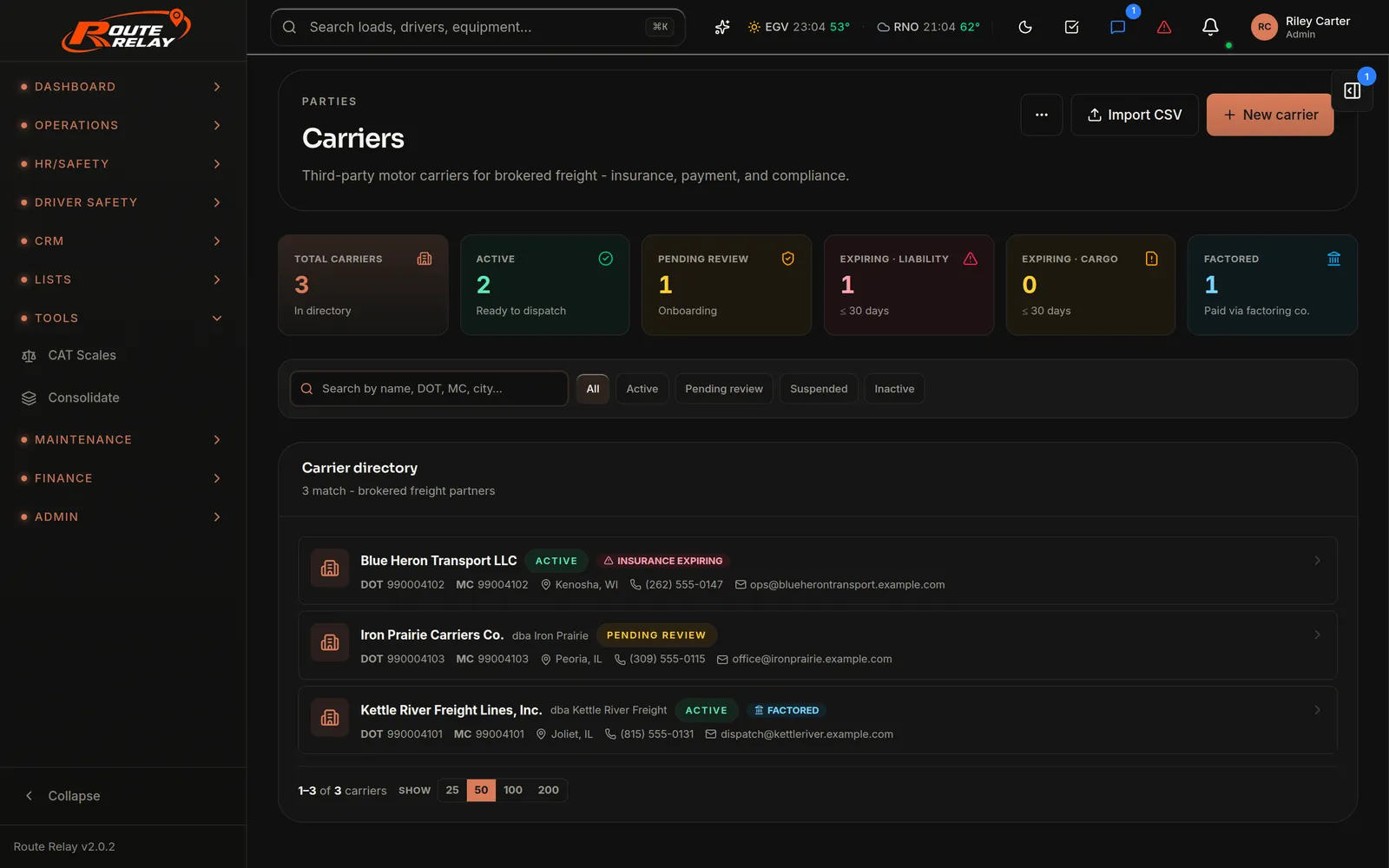
Broker freight without a second system.
Onboard carriers, check them against FMCSA, send the rate con for signature and pay them, in the same workspace as your own trucks.
- A carrier onboarding link, good for 7 days: e-signed agreement, W-9, COIs and authority
- Compliance view of each carrier's gaps, documents and attestations
- Rate confirmations the carrier e-signs from a link, with truck, trailer and driver details
- Carrier VIN and plate checked against public DOT inspection history
- Carrier payables: import the invoice, approve the payee, record the check; with your AI key the import flags factoring notices and remit-to mismatches
- Loads, revenue, pay and margin per carrier
- Carriers
- Carrier compliance
- Settlements › Brokerage
From POD to paid, without the paper chase.
Invoice delivered loads, chase accessorials, export to QuickBooks Desktop and pay drivers every week, all from the load record.
- Invoice PDFs for delivered loads, with payment status tracked
- Detention, lumper, layover and TONU claims; approval puts the charge on the invoice. Automatic detention uses Samsara dwell times
- Weekly driver settlements with deductions, to print, download or email
- Owner-operator fee schedules, dispatcher commission and staff pay
- QuickBooks Desktop through the Web Connector, plus IIF export
- Invoices
- Accessorials
- Settlements
- Exports
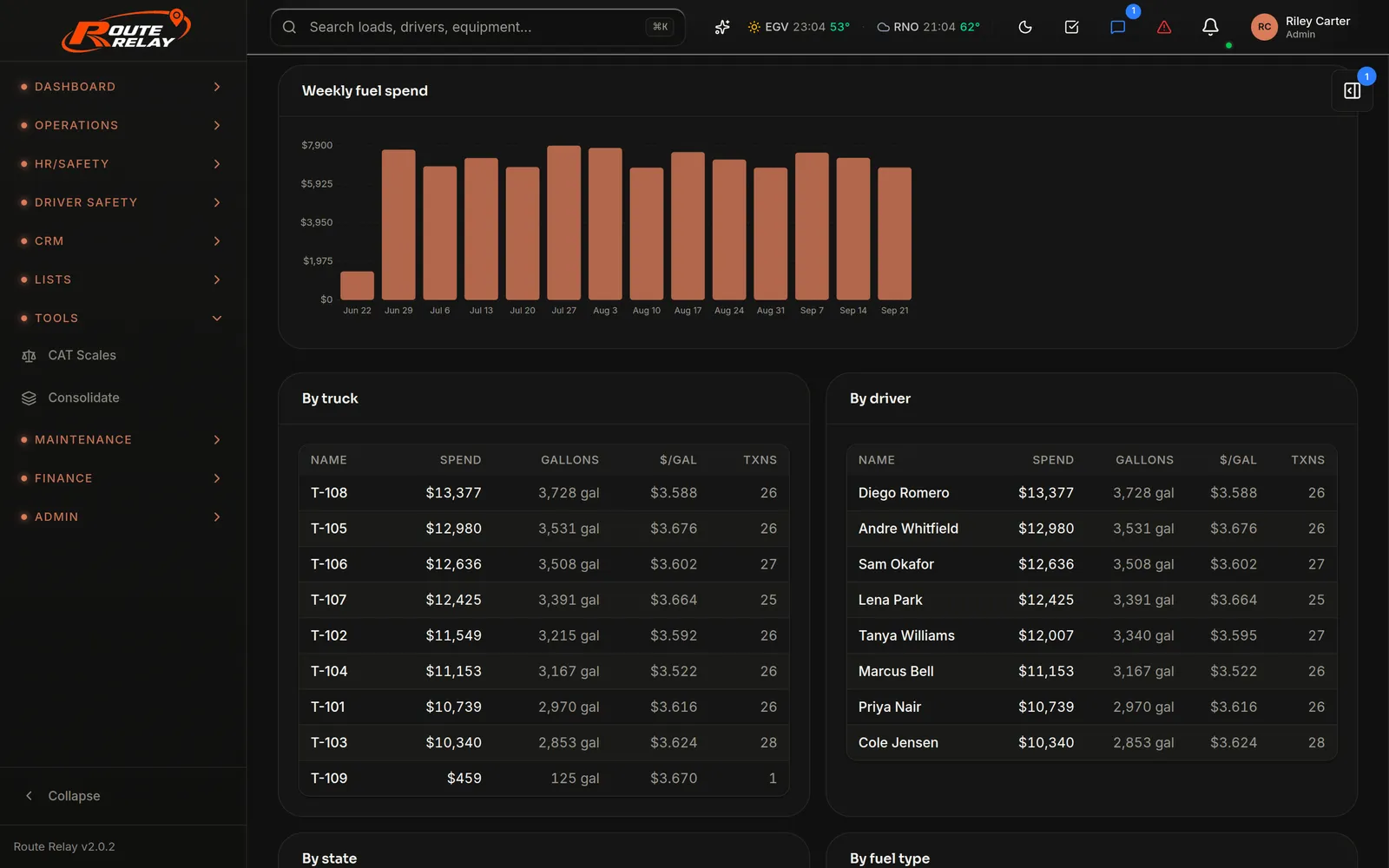
Know what every gallon cost, and where.
EFS card purchases matched to the right truck and driver, fleet fuel analytics and quarterly IFTA figures in one place.
- EFS / Fleet One purchases imported and matched by card, then by unit number
- Scales, cash advances and other non-fuel charges become expenses
- Spend, gallons and price per gallon across the fleet
- Station prices from your own fills and the EFS price feed, on a map
- IFTA: miles by state from Samsara or your trip log, then MPG and net tax due
- Fuel
- Fuel cards
- Fuel prices
- IFTA
Keep trucks rolling and the shop honest.
Repair requests from the road, work orders with real labor and parts, PM schedules, parts and outside customers, in one shop.
- Drivers file repair requests from the driver app, and the shop triages them
- Work orders with labor and parts lines, statuses and totals
- Estimates and invoices from the work order, for your own units or outside customers
- Parts inventory and bundles; vendor invoices read in with your AI key and reviewed before import
- Preventive maintenance schedules for trucks and trailers
- Roadside repairs, with Find service: who fixed this kind of problem nearby, and their number
- Shop
- Work orders
- Parts
- Maintenance

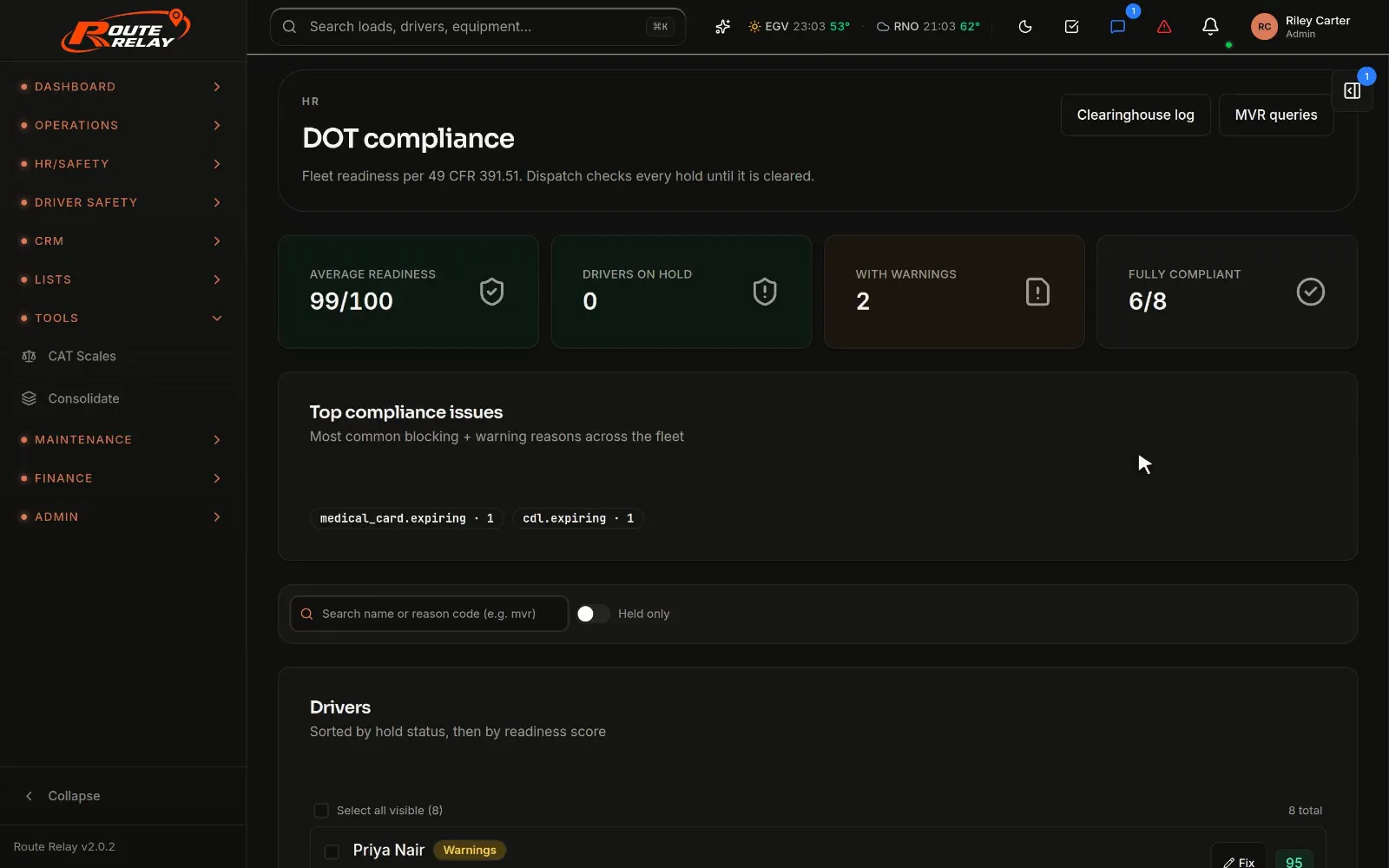
DOT-ready without the binder.
Driver files, testing, MVRs and inspections tracked against the regulations, with compliance holds flagged every time a driver is dispatched.
- A DOT readiness score per 49 CFR 391.51, with expiring-document warnings
- A DQF checklist and packet per driver (CDL, medical card, MVR, drug tests, Clearinghouse, background), exported as an audit-ready ZIP
- Drug and alcohol testing log and Clearinghouse queries (Part 382)
- Annual MVR query log with disqualification flags
- Your roadside inspections and violations from FMCSA's public data
- An incident register for breakdowns, accidents, damage and claims
- HR › Compliance
- Incidents
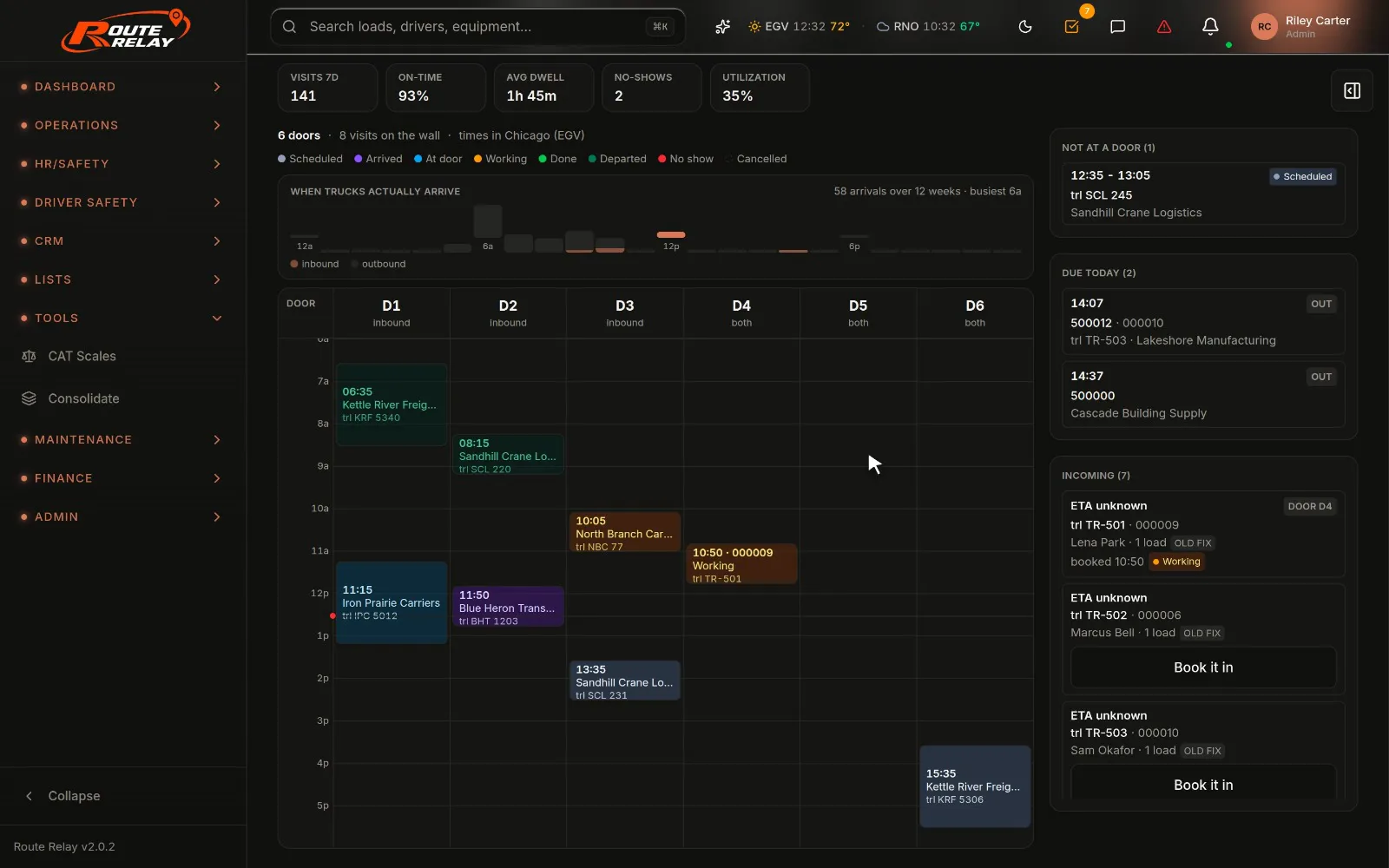
Every door, every hour, one book.
Book trailers into doors by the hour, see what's due today, and give the floor crew an app on their phones to work each visit.
- The appointment book for each terminal: doors across, the day down
- A visit is one trailer at one terminal, so what was booked and what happened is one record
- Times shown in the terminal's own time zone
- Dock floor app with PIN sign-in: Today, Jobs, Time and Restores
- Warehouse services: lumper jobs, a rate card with per-customer overrides, inventory, invoices and aging
- Dock
- Dock floor app
- Warehouse services
Everything included
82 modules. One workspace. All of them in every quote.
No add-ons and no upgrade tier. Filter by area, or just scroll.
Dispatch & planning8
- Dispatch boardIn transit, available, brokerage and history, with an exceptions queue.
- LoadsEvery load from booking to delivery, with its full change history.
- Rate con importUpload a rate con, review what was read, create the load and save the document.
- Load splitsRelay legs at a stop, or splits by pallets, weight or destination.
- 3D load plannerAxle-group weights and GVW against limits.
- Cross-Dock ConsolidationPallets grouped by destination and packed into the fewest trucks, saved as loads.
- RatesRate zones, lane rates and fuel surcharge tables.
- Status boardAn internal Kanban of your loads by status.
Tracking & customers8
- Load timelineDispatch, arrivals, departures and documents in one history.
- Tracking linksA shareable page with the load's stop milestones.
- Customer portalCustomers sign in with a password or an emailed link to see shipments and documents.
- Fleet mapNeeds SamsaraTruck positions, automatic arrivals and ETAs.
- Fleet LiveNeeds SamsaraETA, miles left, HOS and drive time left for every truck.
- CustomersCustomer records with their loads and invoices.
- Address bookSaved pickup and delivery locations.
- Customer blacklistMC numbers with notes and a live FMCSA check; their loads are stopped.
Brokerage6
- CarriersThird-party carriers with insurance, payment and compliance details.
- Carrier onboardingA 7-day link for the e-signed agreement, W-9, COIs and authority.
- Carrier complianceGaps, documents and attestations for every carrier.
- Rate con e-signCarriers e-sign your rate con with truck, trailer and driver details.
- Carrier payablesImport the carrier's invoice, approve the payee, record the check.
- Carrier performanceLoads, revenue, pay and margin per carrier.
Billing & pay10
- InvoicesBill delivered loads, preview invoice PDFs, track payment.
- Accessorial claimsDetention, lumper, layover and TONU, added to the invoice on approval.
- Automatic detentionNeeds SamsaraDetention claims from recorded dwell time.
- Driver settlementsWeekly settlements to print, download or email.
- Driver tripsEvery trip a driver ran, with pay and settlement status.
- Owner-operatorsDispatch fees and standing fee schedules.
- Dispatcher & staff payDispatcher commission and employee base pay.
- Expenses & deductionsSettlement deductions and reimbursements.
- QuickBooks DesktopSync through the QuickBooks Web Connector, with account mappings.
- Accounting exportsPeriod exports for your accounting system, including IIF.
Fuel & IFTA6
- Fuel transactionsNeeds EFSEFS / Fleet One purchases matched to trucks and drivers.
- Fuel cardsAssign each card to a truck, a driver or both.
- Fuel analyticsSpend, gallons and price across the fleet.
- Fuel pricesStation prices from your fills and the EFS price feed.
- Fuel stop plansNeeds Samsara + fuel pricesWhere each truck should fuel, and how it did against the plan.
- IFTAQuarterly miles, MPG and net tax due.
Fleet & shop7
- Trucks & trailersUnit records, status and documents.
- Repair requestsSent by drivers from the app, triaged by the shop.
- Work ordersLabor and parts lines, statuses and totals, as estimates or invoices.
- Parts inventoryCatalog, services and reusable bundles.
- Preventive maintenancePM schedules for fleet equipment.
- Roadside repairsBreakdowns away from the shop, with Find service nearby.
- Shop customersOutside customer accounts and shop invoices.
Safety & compliance7
- DOT readinessA readiness score per 49 CFR 391.51, with holds flagged at dispatch.
- Driver qualification filesA checklist and packet per driver, exported as an audit-ready ZIP.
- Drug & alcohol testingPart 382 testing log, plus Clearinghouse queries.
- MVR logAnnual MVR queries with disqualification flags.
- Roadside inspectionsYour inspections and violations from FMCSA data.
- Driver safety programNeeds SamsaraCamera, speeding and HOS events to review; its holds block dispatch.
- IncidentsBreakdowns, accidents, damage and claims.
Dock & warehouse3
- Dock appointmentsDoors across, the day down, at every terminal.
- Dock floor appThe crew signs in with a PIN: Today, Jobs, Time, Restores.
- Warehouse servicesLumper jobs, a rate card with customer overrides, inventory, invoices, aging.
People & HR8
- DriversDriver profiles, pay rates and documents.
- EmployeesDispatch, shop, office and other staff.
- RecruitingCandidates from New to Hired, in a table or a kanban.
- LeaveApprovals, balances, team calendar, call-offs and policy.
- Leave by QR + PINStaff request leave from a QR code and a PIN.
- TimesheetsHourly clock in and out, with breaks.
- Driver document e-signDocuments drivers sign from a link.
- Driver performanceHow each driver is running.
Sales & CRM4
- CRM dashboardPipeline, follow-ups and conversion in one place.
- Accounts & contactsCommercial contacts across your accounts.
- OpportunitiesA sales pipeline tied to lanes.
- ActivitiesSales calls, reminders and next steps, on a calendar.
Reports7
- ReportsOperational, financial, fleet, driver and maintenance reports.
- Customer agingWho owes what and for how long, with aging statements.
- Deadhead reportEmpty miles between loads.
- DOT trip recordsTrip document packets to preview, print or email, kept for seven years.
- Route ReviewNeeds SamsaraPlanned against driven miles for every trip.
- Report exportsPDF, CSV and Excel exports, with your branding on the PDFs.
- AnalyticsRevenue and delivery trends.
Platform & security8
- Permission groupsTen built-in groups plus your own, across more than 200 permission codes.
- MFAAuthenticator codes, backup codes and step-up checks.
- Audit trailChange history with before and after values.
- AI ActionsNeeds AI keyAI suggestions that wait for a person to approve them.
- WebhooksLoad events sent to your own systems.
- MessagesIn-app chat with drivers and across the team.
- CalendarYour schedule and company meetings.
- To-dosA team-shared task list.
Mobile & field
Built for the cab, the dock and the customer.
Drivers, the dock crew and your customers each get a web app sized for them, running on the same live data as the office.
Installs from the browser
The driver app and the dock floor app add to the home screen. No app store, nothing to approve.
Works in dead zones
Stop updates, photos and messages queue on the phone and send when the signal comes back.
A scanner on the phone
Finds the page edges, straightens the shot and saves a multi-page PDF for the POD, all on the device.
PIN sign-in
Drivers sign in with their phone number and a PIN. The dock crew and staff leave requests use a PIN too.

What's newSeptember 2026
New this month.
The latest additions, straight from the changelog. Anything that depends on an outside account says so.
Dock appointment book + floor app
Book trailers into doors by the hour at each terminal, and work every visit from the dock floor app, signed in with a PIN.
Driver safety program
Camera, speeding and HOS events to review, with escalation rules that propose and a person who decides.
Needs Samsara
Fuel stop plans
Where each truck should fuel along its route, ranked by price, and how every fill compared with the plan.
Needs Samsara + fuel prices
Recruiting pipeline
Candidates from New to Hired, in a table or a kanban, with where every one came from.
Roadside Find service
When a truck breaks down, see who has fixed this kind of problem nearby before, and their number.
Driver document e-sign
Send drivers the documents they need to sign, and they sign from a link on their phone.
Integrations
Plugs into the accounts you already have.
Connect them in Settings. Each one is optional; the features that need one say so.
- SamsaraGPS, auto arrivals, ETAs, HOS, safety events
- EFS (WEX / Fleet One)Fuel-card purchases, cards and prices
- QuickBooks DesktopWeb Connector sync, plus IIF export
- FMCSAMC checks, carrier vetting, inspection data
- TomTomMaps
- Your AI providerAnthropic, OpenAI or Gemini key
- WebhooksLoad events to your own systems
Security & control
Decide who sees what, and keep the receipts.
Your workspace is scoped to your company. Inside it, permissions decide what each person can see and change.
Permission groups
Ten built-in groups plus your own, across more than 200 permission codes.
MFA with step-up
Authenticator-app codes with backup codes, and a fresh check before sensitive admin actions.
Audit history
Changes are kept with their before and after values.
A read-only demo
The live demo runs under a read-only permission group: look at everything, change nothing.
Live demo
Don't book a demo. Open one.
Most TMS vendors make you sit through a sales call before you see a single screen. Ours is one click away: a read-only workspace with a small fleet and loads mid-flight. Look at anything. Change nothing.
Read-only · No email, no signup
- 9 trucks, 9 trailers, 8 driversA believable small fleet, not lorem ipsum
- Loads in every statusQuoted, available, dispatched, in transit, delivered, billed, paid
- The real productThe same screens your dispatchers would use
Pricing
Quoted per fleet. Every module included.
Five trucks and fifty look nothing alike, so there's no rate card. Tell us how you run and we'll put a number in front of you, usually the same day.
Or email sales@routerelay.io
- Every module in every quote
- Quoted to your fleet, not per seat
- No setup or implementation fee
- Free trial first, no credit card
FAQ
Fair questions.
The things carriers actually ask us.
How much does Route Relay cost?
It's quoted to your fleet rather than sold off a rate card, because five trucks and fifty look nothing alike. Every module is included, there's no implementation fee, and the trial comes first. Tell us how you run and we'll come back with a real number, usually the same day.
See how quoting worksDo you charge per user?
No. The quote follows your fleet, so adding a dispatcher, a billing clerk or a safety manager doesn't change what you pay, and nobody has to share a login to save money.
What do I need to start a trial?
Your company name and MC number, your name and job title, a few numbers about your fleet (trucks, trailers, loads a month, warehousing, your own maintenance), a work email and a password. We check the MC number with FMCSA and email you a 6-digit code to activate the workspace. No credit card.
What happens when the 7-day trial ends?
The trial runs 7 days from the moment you verify your email. When it ends, sign-in switches off and nothing is charged, because there's no card on file. Your data stays in place; to keep going, talk to sales (replying to any of our emails works) and we'll turn the workspace back on.
Is the live demo really no-signup?
Really. One click opens a read-only workspace seeded with a small fleet, with trucks, drivers and loads mid-flight. It's the actual product, not a video.
Can we bring our existing data?
Drivers, trucks, trailers, carriers, users and loads import from CSV files, and so do HR records, incidents, timesheets, shop parts, shop customers and work orders, fuel contract prices and the carrier blacklist. Your freight customer records are added in the app; there's no customer import.
How does tracking work? Do we need GPS hardware?
Stop milestones from the driver app and shareable tracking links work on their own. Live truck positions, automatic arrivals and departures, and ETAs come from your own Samsara account, connected in Settings.
How does the AI work?
AI features run on your own provider key (Anthropic, OpenAI or Gemini), so usage is billed to your provider account. Nothing the AI proposes changes your data until a person approves it. Without a key, the built-in parser still reads clean rate cons.
What do drivers use?
The driver web app, on the phone they already carry. It installs from the browser, signs in with a phone number and PIN, and keeps working in dead zones.
Is our data isolated and secure?
Your data is scoped to your company's own workspace, with role-based permission groups, MFA and an audit history of changes. The live demo is a separate read-only workspace, and trial workspaces are never shared.
Calm is a feature. Try it free for 7 days.
No credit card, no sales call, no implementation project. Just your fleet, on one screen.